
Built for Clio
Your Clio contacts have duplicates.
Let's fix that.
MERGEguard scans your Clio contacts, finds duplicates, and safely merges them while preserving matters, billing history, and notes. See the duplicate groups MERGEguard finds in your own Clio for free before you pay anything.
Free. One real scan of your Clio contacts. No card.
The problem
Every Clio firm has duplicate contacts.
It happens to everyone. A client gets entered twice with slightly different names. An assistant creates a new record instead of finding the old one. Intake tools and other integrations add contacts on their own, and Clio's duplicate check never sees them. Over time, your contact list turns into a mess, and cleaning it up by hand becomes a nightmare.
3,800+
duplicate contacts merged in Clio with MERGEguard
Every merge
starts with a snapshot of the duplicate
Until now
there was no merge button for Clio. We built one.
Why it matters
Duplicates don't just look bad. They cause real problems.
Split matter history
Related matters spread across two contact records. Now nothing connects them.
Billing under the wrong contact
Time entries and invoices attributed to a record that shouldn't exist.
Conflict checks that miss things
If a client is in your system twice, a conflict search might only find one of them.
Client-facing embarrassment
Sending documents to the wrong address, or greeting a long-time client like a stranger.
The hard part
The easy duplicates aren't the scary ones.
Two records with a name and a phone number are easy to fix by hand. The scary duplicate is the client with matters, bills, trust activity, communications, documents, and years of history attached. That's the one MERGEguard is built for.
Billing is handled first
Bill recipients and split-payer shares move to the contact you keep, so future bills go to the right person. A contact with open bills is never deleted. MERGEguard stops and tells you what to fix in Clio.
Trust is checked first
Before any contact is deleted, MERGEguard checks it for trust activity and stops if it finds any.
Matters stay whole
Matters where the duplicate is the client move to the contact you keep, along with its communications, notes, documents, relationships, and custom fields. If the duplicate is a second client on a matter, MERGEguard stops and flags it.
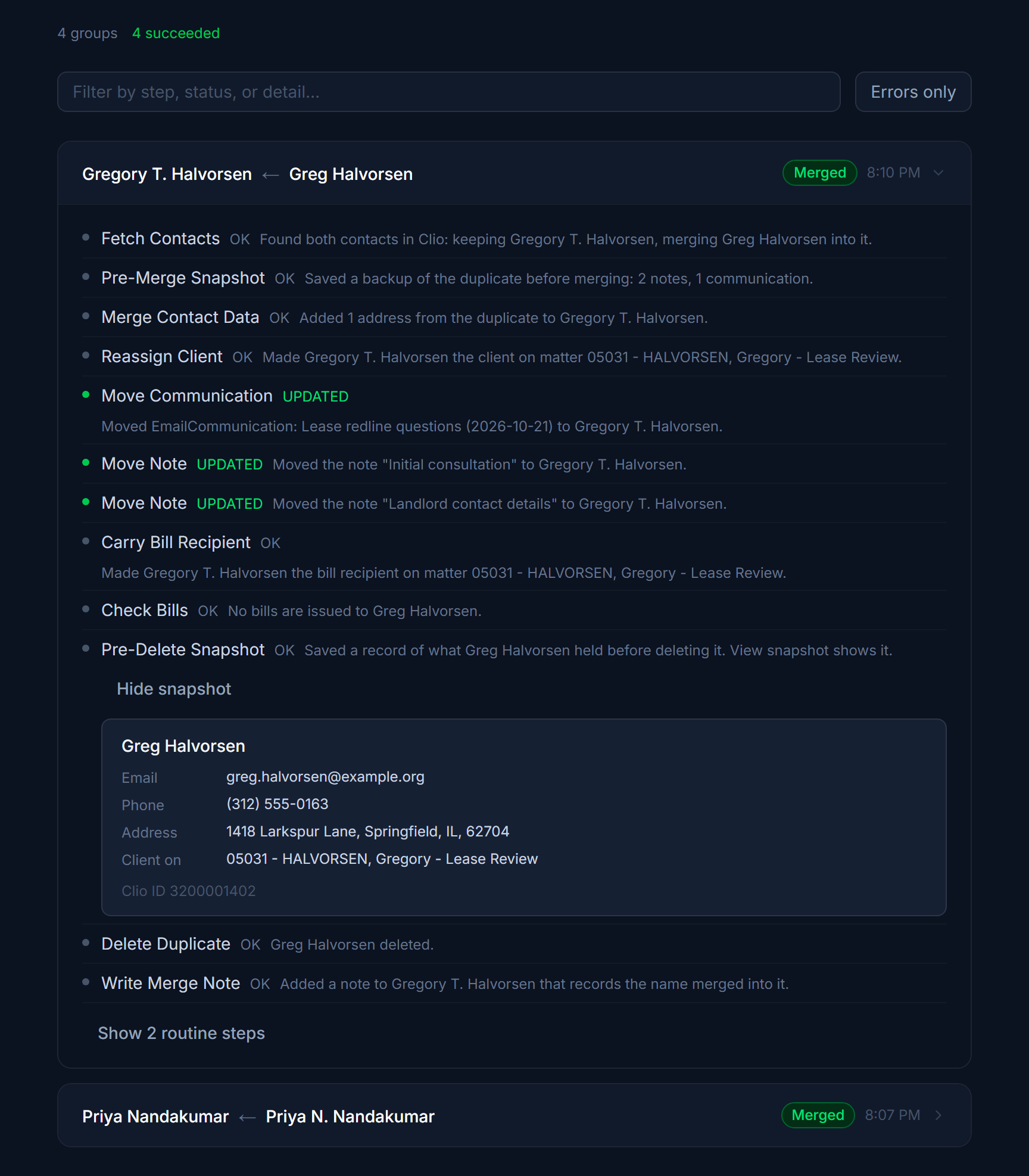
A snapshot before every delete
Before any contact is deleted, whether by a merge or a Delete selection, MERGEguard saves a snapshot of it to the merge log.
The solution
Merging contacts in Clio is risky. MERGEguard makes it safe.
Merging contacts in Clio is risky. You can lose notes, orphan matters, and break billing. MERGEguard handles all of that for you, with a full preview before anything changes.
What happens when you merge with MERGEguard:
- Matters are reassigned to the surviving contact, and a second client on a matter is flagged for you
- Notes and communications are preserved
- Phone numbers, addresses, and emails are merged intelligently
- A note is added to the surviving contact with the merged name(s)
- Unbilled time is flagged before you proceed. No surprises.
How it works
Connect. Scan. Review. Merge.
Connect your Clio account
Sign in to Clio and approve MERGEguard on Clio's own approval screen. Your Clio password never reaches us. The free preview only reads from Clio. Nothing in Clio changes unless you check out and approve merges.
Run a free preview scan
MERGEguard scans your contacts once using names, email addresses, phone numbers, and more, then shows you every duplicate group it finds. The preview is free and doesn't require a card.
Review each group
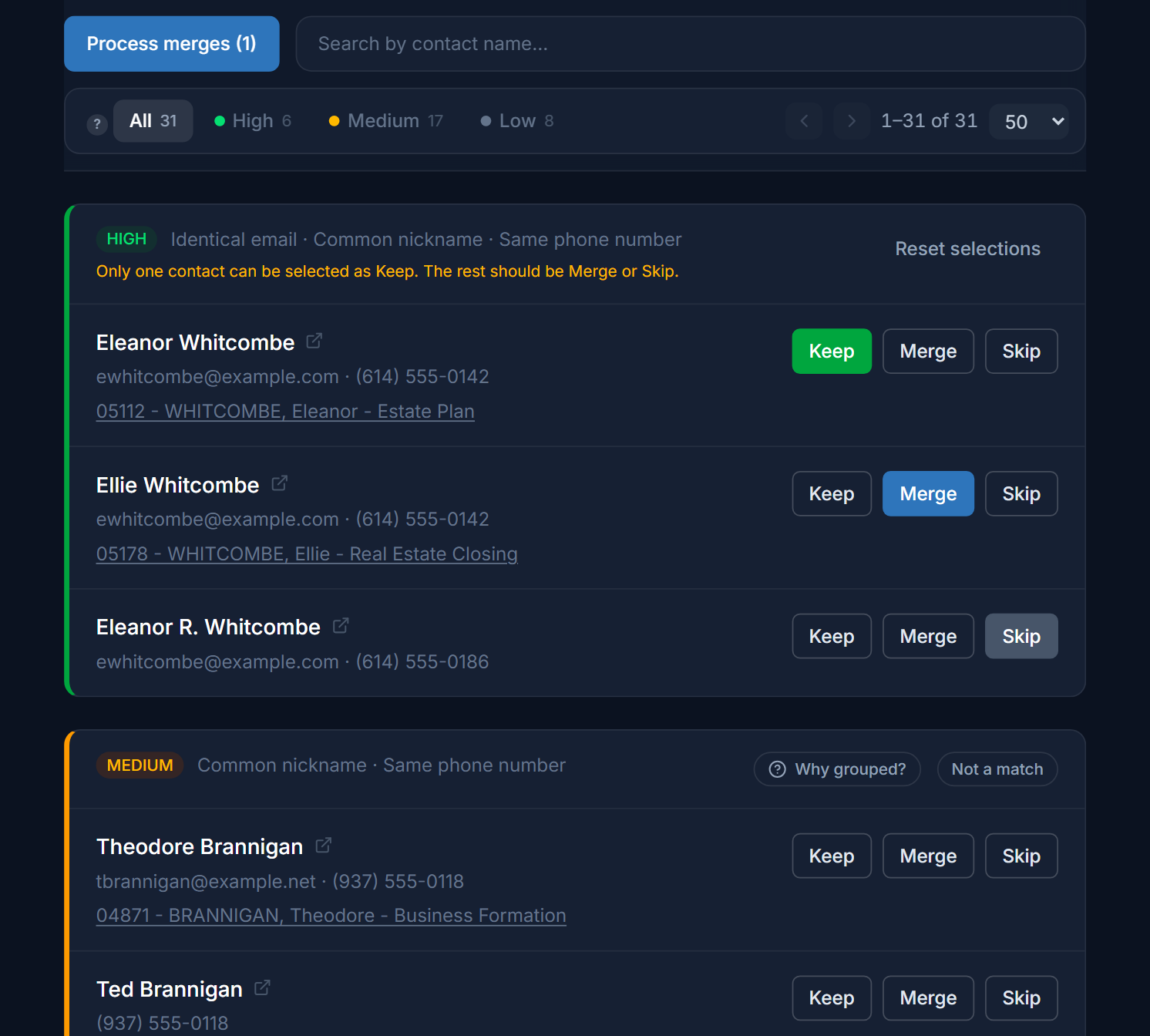
After you check out, you review each suspected duplicate group and choose which contact to keep, which to merge, and which to skip. MERGEguard automatically warns you about unbilled time.
Confirm and merge
One click processes all your decisions. MERGEguard handles everything in the right order and flags anything it can't move.
The app
See what you're working with.
Every duplicate group is laid out clearly. You decide, we execute.
Duplicates creep into Clio faster than you'd think. A client calls as James Smith for estate planning, then two years later as Jim Smith for a probate matter, and suddenly we have two records, each with its own notes, documents, and history. MERGEguard finds those, lets our team review every match before anything changes, and brings the client's full history back together under one record. It solves a problem most Clio firms don't notice until their database is already a mess.
Jennifer Tomac
Tomac & Tomac
Why MERGEguard
Built differently from anything else you've tried.
Clio-native
Built exclusively for Clio. Not a generic CSV tool. We understand Clio's data model: matters, activities, custom fields, relationships.
Review before anything changes
Nothing changes in Clio until you review every decision and confirm. You stay in control start to finish.
Scan summaries
Each scan includes a quick explanation of why contacts were grouped together. Less guessing. More confidence in each decision.
Billing-aware
If a contact has unbilled time on any of their matters, you'll know before you merge. Optional for flat fee firms.
Fast to set up
No onboarding calls. Connect Clio and see your duplicates for free.
Firm-level settings
Configure billing type and merge preferences once. MERGEguard adapts to how your firm actually works.
Safety & trust
We take "don't break client data" seriously.
Law firms rely on their data being accurate. Everything here is built around that.
OAuth-only access
We connect via Clio's official OAuth flow. Your Clio password is never entered or stored.
Confirmation required
Every merge requires explicit confirmation. No auto-merging. Nothing changes in Clio until you confirm.
Full audit trail
Every scan and merge is logged. You can always see what was changed and when.
Skip anything
Not sure about a group? Select Skip. You never have to merge something you're not confident about.
Being upfront
What MERGEguard doesn't do (yet).
MERGEguard is focused on doing one thing extremely well.
Merges can't be undone. That's why nothing runs until you've made your choices and confirmed them, every change lands in the merge log, and every deleted contact is snapshotted first.
We only merge contacts, not matters. Related matters are reassigned, not deduplicated. A second client on a matter is flagged, not moved.
Only works with Clio. This is purpose-built for Clio.
The value
Clio contact cleanup that pays for itself.
Think about how much time your team spends hunting for client info that's split across two records, re-entering contact details, or correcting billing errors. After the first cleanup, scheduled scans keep checking your Clio contacts daily, weekly, every other week, or monthly, and email you what they find. A scheduled scan never changes anything in Clio. You still review and confirm every merge.
Less admin
Fewer "which record is right?" questions from staff. One source of truth per client.
Better billing
All time entries under the right contact. No more hunting split billing history.
Cleaner conflicts
Conflict checks actually work when each client has exactly one record.
Your Clio database deserves to be clean.
See what's actually hiding in your Clio contacts. The preview is free. When you're ready to clean them up, MERGEguard walks you through each decision and handles the merge.